Showing posts with label Computer Technology. Show all posts

Thursday, March 26, 2015

BitWhisper: Stealing data from the computers which are not connected with internet using heat


No matter how secure you think a computer is, there’s always a vulnerability somewhere that a remote attacker can utilize if they’re determined enough. To reduce the chance of sensitive material being stolen, many government and industrial computer systems are not connected to outside networks. This practice is called air-gapping, but even that might not be enough. The Stuxnet worm from several years ago spread to isolated networks via USB flash drives, and now researchers at Ben Gurion University in Israel have shown that it’s possible to rig up two-way communication with an air-gapped computer via heat exchange.
Researchers call this technique of harvesting sensitive data “BitWhisper.” It was developed and tested in a standard office environment with two systems sitting side-by-side on a desk. One computer was connected to the Internet, while the other had no connectivity. This setup is common in office environments where employees are required to carry out sensitive tasks on the air-gapped computer while using the connected one for online activities.
BitWhisper does require some planning to properly execute. Both the connected and air-gapped machines need to be infected with specially designed malware. For the Internet box, that’s not really a problem, but even the air-gapped system can be infected via USB drives, supply chain attacks, and so on. Once both systems are infected, the secure machine without Internet access can be instructed to generate heating patterns by ramping up the CPU or GPU. The internet-connected computer sitting nearby can monitor temperature fluctuations using its internal sensors and interpret them as a data stream. Commands can also be sent from the Internet side to the air-gapped system via heat.
The malware is able to use the heat patterns as a covert data channel between the machines, thus defeating the air-gap. The data rate between the connected and air-gapped computers isn’t particularly fast — it’s somewhere around eight bits per hour. Still, that’s enough to snatch passwords and text files over time. Because all the data theft takes place over invisible heat signals, there are almost no signs of intrusion in the secure network.
Once the malware has found a home in the air-gapped network, it can be instructed to spread to other computers in search of more heat-driven communication channels. The researchers say a secure network is vulnerable to BitWhisper anywhere an internet-connected PC is 15-inches or less away from an air-gapped system. BitWhisper can seek out new connections by sending out periodic “thermal pings” to link up nearby computers.

The researchers demonstrated BitWhisper using a computer with a USB missile-launcher toy attached. In the video above, they were able to send heat commands from the connected system over the air-gap to the isolated system and control the missile launcher. There are a lot of things that can go wrong with this system — something as small as a desk fan could break the connection. Still, it’s an ingenious proof-of-concept.

Tuesday, March 17, 2015

TINY CIRCULATOR IN PHONES COULD DOUBLE BANDWIDTH

Radio wave circulator developed by researchers at the Cockrell School of Engineering.

Engineers have found a way to dramatically shrink a critical component of cellphones and other wireless devices.
A much smaller, more efficient radio wave circulator has the potential to double the useful bandwidth in wireless communications by enabling full-duplex functionality—meaning devices can transmit and receive signals on the same frequency band at the same time.
The researchers did it by ditching the magnets.
“We are changing the paradigm with which isolation and two-way transmission on the same frequency channel can be achieved. We have built a circulator that does not need magnets or magnetic materials,” says Andrea Alu, an associate professor at the Cockrell School of Engineering at the University of Texas at Austin.

Since the advent of wireless technology 60 years ago, magnetic-based circulators have been in principle able to provide two-way communications on the same frequency channel, but they are not widely adopted because of the large size, weight, and cost associated with using magnets and magnetic materials.
Freed from a reliance on magnetic effects, the new circulator has a much smaller footprint while also using less expensive and more common materials.
The prototype circulator is 2 centimeters in size—more than 75 times smaller than the wavelength of operation. The circulator may be further scaled down to as small as a few microns, according to the researchers.
The design is based on materials widely used in integrated circuits such as gold, copper, and silicon, making it easier to integrate in the circuit boards of modern communication devices.


HOW IT WORKS

The researchers’ device works by mimicking the way magnetic materials break the symmetry in wave transmission between two points in space, a critical function that allows magnetic circulators to selectively route radio waves.
With the new circulator, the researchers accomplish the same effect, but they replaced the magnetic bias with a traveling wave spinning around the device.
Another unique feature is that the new circulator can be tuned in real time over a broad range of frequencies, a major advantage over conventional circulators.
“With this technology, we can incorporate tunable nonreciprocal components in mobile platforms,” says Nicholas Estep, lead researcher and a doctoral student in electrical and computer engineering. “In doing so, we may pave the way to simultaneous two-way communication in the same frequency band, which can free up chunks of bandwidth for more effective use.”

FEWER DROPPED CALLS

For telecommunications companies, which pay for licenses to use frequencies allotted by the US Federal Communications Commission, a more efficient use of the limited available bandwidth means significant cost advantages.
Additionally, because the design of the circulator is scalable and capable of circuit integration, it can potentially be placed in wireless devices.
“We envision micron-sized circulators embedded in cellphone technology. When you consider cellphone traffic during high demand events such as a football game or a concert, there are enormous implications opened by our technology, including fewer dropped calls and clearer communications,” Estep says.

The circulator also could benefit other industries that currently use magnetic-based circulators. For instance, circulators used in phased arrays and radar systems for aircraft, ships, and satellites can be extremely heavy and large, so minimizing the size of these systems could provide significant savings.

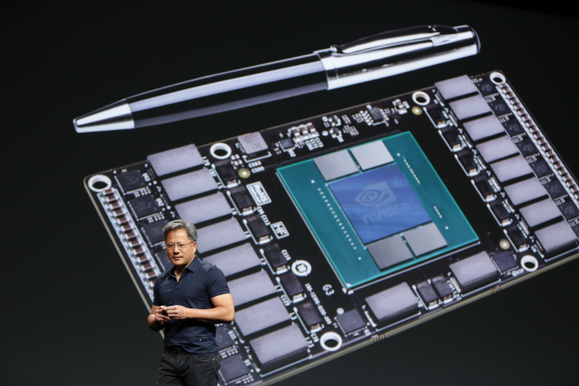
Nvidia's next-gen Pascal GPU

Nvidia's next-gen Pascal GPU will offer 10x the performance of Titan X, 8-way SLI

If Nvidia's beastly new Titan X graphics card wows you—and it should—well, hold onto your pants: The company said it's next-gen GPU technology, codenamed Pascal, will offer roughly ten times the performance of the Titan X, at least in compute tasks.

The next-generation GPU from Nvidia would also offer a host of new technologies, including 3D-stacked memory and NVLink, said CEO Jen-Hsun Huang during the GPU Technology Conference's keynote in San Jose. The GPU will essentially be a super computer, Huang said, and Nvidia is shooting for it to be ten times faster than today's Maxwell-based GPUs.

Huang also revealed that a Pascal GPU could run up to 32GB of RAM, rather than the maximum of 12GB a Maxwell-based card can use.

All-important memory bandwidth—which can choke a GPU's performance if it can't keep up—will be three times that of Maxwell. Since Pascal will feature the company's upcoming NVLink technology, which Nvidia claims outperforms PCI-E by five times, Huang says he expects to be able to run up to eight discrete GPUs in a single machine, rather than today's limit of four.


Volta
Also back on Nvidia's roadmap is its Volta chip. Volta was originally scheduled to be the follow up to its Maxwell parts but was mysteriously pulled from last year's GTC roadmap, with Pascal put in its place. The roadmap Huang showed off showed Pascal availability in 2016, with Volta slated for 2018.
No details of Volta were revealed, but that GPU was to use stacked RAM and unified memory. Pascal is now expected to be the first GPU from Nvidia to use stacked RAM chips and NVLink.

Saturday, December 27, 2014

Intel’s Core M

Is Intel’s Core M efficient

Updated(27-12-2014)
At IFA 2014, Intel gave us the full skinny on its fifth-generation Broadwell-based Intel Core M CPUs. The chips would be thinner, and more energy-efficient than past CPUs, while also offering solid performance. They would pave the way for slimmer, lighter devices than anything we’ve ever seen before.
If our time with the Core M-powered Lenovo Yoga 3 Pro is any indication, that latter bit is true. But what about the energy efficiency and performance aspects? Does Core M measure up, or does it come up short?
What’s Core M supposed to do again?
The most efficient chips from about four years ago need 18.5 watts to operate. Similar chips from last year require 11.5 watts of power. Core M cuts that number down drastically, asking for a mere 4.5 watts of juice.
However, there’s more to Core M than increased efficiency, and (presumably) better battery life for whatever devices it’s in. Core M chips are also, as we mentioned, much smaller than their older siblings. Core M hardware measures 30 x 16.5 x 1.05 millimeters thick, while fourth-generation Intel hardware measures 40 x 24 x 1.5 millimeters. That’s a significant reduction
Related: Intel dishes on Core M at IFA 2014
So, it’s simple math. Smaller hardware means more space in system cases for PC makers to work with. This, in turn, leads to slimmer, and lighter devices, like in the case of the Yoga 3 Pro.
Also, because Core M sips on energy, it can operate while fan-less. This allows computer manufacturers to omit components from their systems that are associated with keeping internals cool, including fans, heat-sinks, and air vents.
Sizing up our Core M chip
Keep in mind that Core M consists of a family of chips, not just one part. The one we got our hands on, the 5Y70, is the second most powerful Core M chip that Intel is launching as part of this wave of silicon. The Intel Core M-5Y70 is a dual-core chip clocked at 1.1GHz, with a Turbo Boost clock of 2.6GHz.
Not only is this the fastest Core M chip that’s out now, it’ll only be 100MHz slower than the highest-end Core M chip that Intel is launching this year. The next chip up on the totem pole is the 5Y71. That CPU runs at 1.2GHz, sports a Turbo Boost clock of 2.9GHz, and is also a dual-core chip.
Graphics performance
Processing power may not be the CPU’s forte, but how does the Core M’s Intel HD Graphics 5300 GPU get by?
The Lenovo Yoga 2 Pro scored 3,889 in 3DMark Cloud Gate, and 579 in 3DMark Fire Strike. The Dell XPS 13 got 4,507 and 627 in the same tests, respectively. The Lenovo Yoga 3 Pro lags behind both significantly, with scores of 2,636 in Cloud Gate, and 376 in Fire Strike.
Though the Yoga 2 Pro and the Dell XPS 13 don’t conquer these tests, they’re in a different league. Both have well over 1,000 points on the Yoga 3 Pro in 3DMark Cloud Gate, and scores that are at least 200 points higher in Fire Strike.
Combine that with real-world performance, and you’ve got yourself a clear picture of what a graphics chip can do. We fired up League of Legends, a popular game that’s also the least demanding title we use to test GPUs.
Forget about enjoying it with the Core M, at least on the Yoga 3 Pro. With League of Legends running at the display’s native resolution of 3,200 x 1,800, the game ran between 18, and 8 frames per second. The game’s visual details were set to Medium.
For what it’s worth, we’re curious to see how Core M will fare on 720p and 1080p systems. We think it could manage at 1080p based on its 3DMark score, if only by the skin of its teeth.
Better endurance
In the Peacekeeper Web browsing benchmark test, the Lenovo Yoga 3 Pro lasted only three hours and 44 minutes on a single charge. That’s a notable improvement of 30 minutes over the Yoga 2 Pro’s time of three hours and 14 minutes. Both notebooks have 3,200 x 1,800 displays.
The Dell XPS 13 is in another league here, lasting seven hours and 48 minutes in the same test. Of course the 13 has a much less demanding 1080p display to work with.
Since both Yogas are forced to push an extremely high amount of pixels, the battery is taxed significantly as a result.
These days, 1080p is the sweet spot of display resolutions. That’s especially the case with laptops, where battery life has to be a key consideration when PC makers outfit their systems.
As with graphics capabilities, we want to see what Core M can provide in a 720p or 1080p system. In the Yoga 3 Pro, however, no amount of CPU-centric power efficiency can save Lenovo’s latest from a poor battery life score.
Better than it seems
The Intel Core M looks like a disappointment. It’s not as quick as previous Intel 4th-generation processors, and it doesn’t always lead to outstanding battery life. You might be wondering – what’s the point?
Closer inspection, however, reveals there’s actually significant improvement here. Consider the multi-core GeekBench score of 4,267. That’s several hundred less than the an ultrabook with an Intel Core i5-4200U, but that 4th-generation processor has a quoted Thermal Design Power (TDP) of 15 watts. The  Core M-5Y70 has a quoted TDP of 4.5 watts. On paper that means the Core M manages almost equivalent performance on a third of the power. In reality TDP does not translate to actual power draw (it’s a guideline for laptop manufacturers, not a benchmark), but in any case it’s clear the Core M consumes far less juice.
That may be hard to believe given the Yoga 3 Pro’s poor battery life, but several of Lenovo’s design decisions make life difficult even for the Core M. The most important is not the screen but rather the battery, which is rated at 44 watt-hours. That’s not small, but it’s not large, and it’s ten watt-hours smaller than the battery in the Lenovo Yoga 2 Pro. In other words, Lenovo’s design choice to save weight by reducing the size of the battery has mostly negated the advantage of the new, power-sipping processor. Most manufacturers will not make the same decision.
And remember, this early look at Core M and Broadwell is just the first slice of the pie. CES 2015 is where Intel will reveal the meat of its product line, and while the official details of those chips aren’t yet available it’s safe to assume we’ll see some with a 15 watt TDP (or somewhere near), just as with the 4th-generation Core line. Those processors will likely manage a noticeable boost in both battery life and performance. 2015 may prove an excellent time to upgrade if you own a laptop that’s getting on in years.

Monday, December 22, 2014

Inside At End Of Your Laptop and other devices Chargers?

Ever Wondered What’s Inside This Bead At End Of Your Laptop Charger? Mystery Solved!


We all have a basic idea about the purpose of each wire going in and out of our computer. But a few wires seem a bit off when it comes to their appearance. They have a cylindrical bead dangling near the end. So what’s this bead doing on that wire and what purpose does it serve? Today, we are going to unravel this mystery for you.
Ferrite bead
You will not only find this bead at end of charging cables but also mouse, keyboard and other peripheral cables. It turns out that lump’s called a ferrite bead or, more generically, a choke. It’s a fancy name for what’s basically an electromagnetic wave-bouncer. If you open this bead, you will not find any complex circuits but only a ferrite cylinder that is magnetic in nature. It is this magnetic quality of the bead that serves the purpose.
Ferrite bead 2
So basically, when current passes through any cable, it generates electromagnetic interference (EMI). Your electronic gadgets also produce EMI during operation. For example, if you connect a camera to your monitor, the camera would produce intereference and cause your monitor to flicker without the presence of a ferrite bead. If left unabated, EMI can wreck havoc with your computer peripherals.
electromagneticMagnetic Field
These ferrite chokes ensure that signals are only sent in the intended directions and no EMI is transmitted between the peripherals. The choke dampens these EMI waves by acting as an EMI blocker. The blocking is most effective when it is near the source of the EMI, thats why you will only find these ferrite beads near the end of the cables. So, this little mystery is now solved! These tiny cyst-like beads make sure that our computer peripherals work properly and don’t cause any issues for the computer itself.


Tuesday, January 7, 2014

Did you know ???


* VIRUS - Vital Information Resource
UnderSeized.
* 3G -3rd Generation.
* GSM - Global System for Mobile
Communication.
* CDMA - Code Divison Multiple
Access.
* UMTS - Universal
MobileTelecommunication System.
* SIM - Subscriber Identity Module .
* AVI = Audio Video Interleave
* RTS = Real Time Streaming
* SIS = Symbian OS Installer File
* AMR = Adaptive Multi-Rate Codec
* JAD = Java Application Descriptor
* JAR = Java Archive
* JAD = Java Application Descriptor
* 3GPP = 3rd Generation Partnership
Project
* 3GP = 3rd Generation Project
* MP3 = MPEG player lll
* MP4 = MPEG-4 video file
*AAC = Advanced Audio Coding
* GIF= Graphic Interchangeable
Format
* JPEG = Joint Photographic Expert
Group
* BMP = Bitmap
* SWF = Shock Wave Flash
* WMV = Windows Media Video
* WMA = Windows Media Audio
* WAV = Waveform Audio
* PNG = Portable Network Graphics
* DOC = Document (MicrosoftCorpo
ration)
* PDF = Portable Document Format
* M3G = Mobile 3D Graphics
* M4A = MPEG-4 Audio File
* NTH = Nokia Theme (series 40)
* THM = Themes (Sony Ericsson)
* MMF = Synthetic Music Mobile
Application File
* NRT = Nokia Ringtone
* XMF = Extensible Music File
* WBMP = Wireless Bitmap Image
* DVX = DivX Video
* HTML = Hyper Text Markup
Language
* WML = Wireless Markup Language
* CD -Compact Disk.
* DVD - Digital Versatile Disk.
*CRT - Cathode Ray Tube.
* DAT - Digital Audio Tape.
* DOS - Disk Operating System.
* GUI -Graphical User Interface.
* HTTP - Hyper Text Transfer
Protocol.
* IP - Internet Protocol.
* ISP - Internet Service Provider.
* TCP - Transmission Control
Protocol.
* UPS - Uninterruptible Power
Supply.
* HSDPA - High Speed Downlink
PacketAccess.
* EDGE - Enhanced Data Rate for
GSM[GlobalSystem for Mobile
Communication] Evolution.
* VHF - Very High Frequency.
* UHF - Ultra High Frequency.
* GPRS - General PacketRadio
Service.
* WAP - Wireless ApplicationProt
ocol.
* TCP - Transmission ControlProtocol
.
* ARPANET - Advanced
ResearchProject Agency Network.
* IBM - International Business
Machines.
* HP - Hewlett Packard.
*AM/FM - Amplitude/ Frequency
Modulation.
* WLAN - Wireless Local Area
Network

Saturday, January 4, 2014

Bill Gates Says Control-Alt-Delete was a mistake

Bill Gates Says Ctrl+Alt+Delete is IBM's Fault


Ctrl + Alt + Del. You've probably done it hundreds of times over the years you've been using computers. But did you know that Bill Gates never wanted that sequence to exist in the first place? Apparently, Gates wanted the function of Ctrl + Alt + Delete to be taken care of with a single button. Unfortunately, IBM's keyboard design didn't allow for it.
"It was a mistake," the Verge quotes Gates as saying during an interview at a Harvard fundraising campaign. "We could have had a single button, but the guy who did the IBM keyboard design didn't wanna give us our single button."
Despite Gates' admission that he sees the combination as a mistake, it still exists on Windows machines today. The engineer that came up with it is David Bradley, who worked as a designer on early IBM computers. According to CNN, Bradley says they didn't mean for it to be available outside of development.
"I originally intended for it to be what we would now call an Easter egg -- just something we were using in development and it wouldn't be available elsewhere," Bradley said in 2011. "But then (software publishers) found out about it. They were trying to figure out how to tell somebody to start up one of their programs, and they had the answer. Just put the diskette in, hit Control-Alt-Delete, and by magic your program starts."
Bill Gates left Microsoft Gates stepped down from his position as CEO of Microsoft in January of 2000 and instead filled the role of 'Chief Software Architect.' In 2008, he stopped working full-time at Microsoft to focus more on his philanthropy.

September 26, 2013 

Memory Hierarchy PDf

Sunday, December 29, 2013

WiTrack (Through-wall 3D Tracking using body Radio Reflections)


Through-Wall 3D Tracking Using Body Radio Reflections
WiTrack is a device that tracks the 3D motion of a user from the radio signals reflected off her body. It works even if the person is occluded from the WiTrack device or in a different room. WiTrack does not require the user to carry any wireless device, yet its accuracy exceeds current RF localization systems, which require the user to hold a transceiver. It transmits wireless signals whose power is 100 times smaller than Wi-Fi and 1000 times smaller than cellphone transmissions.
WiTrack localizes the center of a human body to within 10 to 13 cm in the x and y dimensions (about the size of an adult hand), and 21 cm in the z dimension. It also provides coarse tracking of body parts, identifying the direction of a pointing hand with a median of 11.2 degrees. It can also detect falls with 96.9% accuracy. WiTrack can be incorporated into consumer electronics and has a wide set of applications.


Gaming in the Entire Home

WiTrack enables games in which users move around freely in the entire home. Unlike today's gaming interfaces (like Xbox Kinect), it does not require a player stand right in front of it to play a game. It can stalk him as he runs down hallways or hides behind furniture and walls from video game enemies.
Elderly Monitoring & Fall Detection

Falls are the leading cause of both fatal and nonfatal injuries among adults aged 65 and over. Current fall detection systems require the user to wear sensors or place cameras in her home, which invade her privacy. WiTrack can detect falls with 96.9% accuracy, even through walls and simply by using reflections off a person's body.
Controlling Household Appliances

WiTrack allows a user to control a household appliance, like turning a light on or off, by simply pointing his or her hand in its direction - even if it is in a completely different room.


ایم آئی ٹی کا تیار کردہ وائی ٹریک … ٹریکنگ سسٹم جو دیوار اور رکاوٹوں کے پار بھی کام کرتا ہے


ایم آئی ٹی کی کمپیوٹر سائنس اینڈ آرٹی فیشل انٹیلی جنس لیبارٹری کے محققین نے ایک ہائی ریزولوشن ، تھری ڈی موشن ٹریکنگ سسٹم تیار کیا ہے جو دیوار اور دیگر رکاوٹوں کے پار بھی کام کرسکتا ہے۔ یہ سسٹم ایک جگہ پر مستقل طور پر کمپیوٹر کے ساتھ نصب ہوتا ہے اور کسی چلتے پھرتے شخص کو پورے گھر میں انتہائی درستگی کے ساتھ ٹریک کرسکتا ہے۔ حتیٰ کہ اگر وہ شخص کسی دیوار کے پیچھے چلا جائے تو بھی یہ سسٹم اس کی پوزیشن شناخت کرسکتا ہے۔ اس سسٹم کی ریزولوشن بھی زبردست ہے جس کی وجہ سے یہ دیوار کے پیچھے سے کئے گئے اشاروں ( ہاتھ کا اشارہ یا جسم کی کوئی مخصوص حرکت) کو بھی آسانی سے شناخت کرسکتا ہے۔
witrack-diagramوائی ٹریک انتہائی سادہ اور سستا سسٹم ہے۔ جبکہ اس کے مقابل مائیکروسافٹ Kinect عام اور انفرا ریڈ کیمروں کی مدد سے ٹریکنگ کرتا ہے (اسے کمپیوٹر وژن کہا جاتا ہے) ۔ یہی وجہ ہے کہ کنکٹ رکاوٹوں کے پار کام نہیں کرتا۔ کیمروں کی مدد سے حاصل شدہ ڈیٹا کو سمجھنے کے لئے اسے ایک پیچیدہ الگورتھم سے گزارا جاتا ہے۔ اس کے مقابلے میں وائی ٹریک میں کیمرے استعمال ہی نہیں کئے جاتے اور پروسسینگ کا کام بھی سادہ ہے۔
وائی ٹریک وائرلیس ٹریک کا مخفف ہے اور یہ اشیاء (یا شخص) کی حرکت کو ریڈیو ویووز کے ذریعے شناخت کرتا ہے۔ یہ ریڈیو وویوز انتہائی کم قوت کی ہوتی ہیں۔ محققین کے مطابق یہ وائی فائی سگنلز کی قوت سے 100 گنا کمزور اور موبائل فون کی شعاعوں سے 1000 گنا تک کمزور ہوتی ہیں۔ اس سے اندازہ ہوتا ہے کہ ان ریڈیو ویووز کی قوت 1 سے 2 ملی واٹ تک ہوسکتی ہے۔ اس سسٹم میں کل 4 انٹینا نصب ہوتے ہیں۔ ایک انٹینا سے ریڈیو ویووز نشر کی جاتی ہیں جبکہ باقی تین انٹینوں سے نشر کی گئی شعاعوں کو وصول کیا جاتا ہے


Wednesday, December 4, 2013

Hyper-threading and its drawbacks


Hyper-threading
(officially Hyper-Threading Technology or HT Technology, abbreviated HTT or HT)
For each processor core that is physically present, the operating system addresses two virtual or logical cores, and shares the workload between them when possible. The main function of hyper-threading is to decrease the number of dependent instructions on the pipeline. It takes advantage of superscalar architecture (multiple instructions operating on separate data in parallel). They appear to the OS as two processors, thus the OS can schedule two processes at once. In addition two or more processes can use the same resources. If one process fails then the resources can be readily re-allocated.

Hyper-threading requires not only that the operating system supports SMT, but also that it be specifically optimized for HTT, and Intel recommends disabling HTT when using operating systems that have not been optimized for this chip feature.


Drawbacks
When the first HT processors were released, many operating systems were not optimized for hyper-threading technology (e.g. Windows 2000 and Linux older than 2.4).
In 2006, hyper-threading was criticised for energy inefficiency. For example, specialist low-power CPU design company ARM stated simultaneous multithreading (SMT) can use up to 46% more power than ordinary dual-core designs. Furthermore, they claimed SMT increases cache thrashing by 42%, whereas dual core results in a 37% decrease.  Intel disputed this claim, stating that hyper-threading is highly efficient because it uses resources that would otherwise be idle.
In 2010, ARM said it might include simultaneous multithreading in its future chips; however, this was rejected in favor of their 2012 64-bit design.

JOIN US ON FACEBOOK


Thursday, November 28, 2013

Core and Thread


Core and Thread

A "core" represents an actual physical subset of a processor that can by itself handle processing, whereas a "thread" is how many actual processes the processor can handle at once. Intel has developed a technology they label "hyper-threading" this technique allows for one physical core (which would normally only be able to handle one thread at a time) to now be able to handle two threads simultaneously.
A thread is a task that the processor must handle, for a simple explanation, you can assume that every application you open (such as paint, notepad, media player) has its own thread... now this does not mean you can only open 2 applications at once, simply because the processor and OS work so fast at 'switching threads' to handle the needs of every application that you have open. You will just experience better performance with more cores because now you can dish out all of the work to more core processors.
For example, a computer has an i7 in it. The i7 has 4 physical cores, but each core can do 'hyper-threading' which allows this processor to handle 8 threads at once. So if you open up the task manager, you will see 8 boxes for processor performance scale.
A general rule of thumb is that more physical cores are better than more threads. So if you were comparing a processors that had 4 cores and 4 threads, would be better than 2 cores 4 threads. But the more threads your processor can handle, the better it will perform while multitasking and for some very intensive applications (video editing, CAD, CAM, Compression, Encryption, etc) will in itself utilize more than one core at a time.

Join us on facebook

Wednesday, November 27, 2013

Intel Core i7 processor families

Intel Core i7 processor families

The latest generation of high-performance Intel x86-compatible microprocessors, branded Core i7, was released on November 17, 2008. Intel Core i7 microprocessors are based on new Nehalem microarchitecture, which, like AMD K8 microarchitecture, replaces Front-Side Bus interface with on-die memory controller with its own dedicated memory bus, and a separate QuickPath Interconnect (QPI) controller that uses point-to-point protocol to communicate with I/O devices and other processors in multi-processor systems. Server-class Core i7 CPUs have two point-to-point links. Other major features of the Nehalem microarchitecture include:
  • Simultaneous Multi-Threading feature adds Hyper-Threading technology to each microprocessor core, which allows any Core I7 quad-core CPU to execute 8 threads at the same time.
  • Each core now includes very low latency non-shared 256 KB level 2 cache. All cores share large level 3 cache.
  • Turbo Boost technology temporary improves CPU performance by increasing core frequency of active cores.
  • Quad-core design on a single die. Previous generation of Intel quad-core processors, Core 2 Quad essentially packed two dual-core processors into one package.
  • Future Core i7 CPUs may have up to 8 cores.
There are many other performance improvements in Core i7 processors, such as enhanced branch prediction, secondary 512-entry TLB buffer, new SSE4.2 instructions, and others.
Intel Core i7 microprocessors are packaged in 1366-land Land-Grid Array (LGA) package, and require socket 1366 motherboards. Future Core i7 processors may also be packaged into 1156-land LGA package.

Intel Core i7-920 - AT80601000741AA / BX80601920 / BXC80601920Picture of: Intel Core i7-920 - AT80601000741AA / BX80601920 / BXC80601920


Core I7 family of quad-core microprocessors incorporates all basic features of the Nehalem microarchitecture - integrated memory controller, Quick Path Interconnect running at 2400 MHz, HyperThreading, Intel 64 technology, 256 KB level 2 cache per core, 8 MB level 3 cache shared between all cores and SSE 4 support. Performance-wise these processors are faster than Core 2 Quad CPUs at the same frequency, and in some applications the difference in performance can be as big as 50%. The Core i7 processors are packaged in new 1366-land LGA package and are not compatible with older Core 2 Duo/Quad motherboards.

Core i7 Extreme Edition family includes top-performance microprocessors based on Nehalem microarchitecture. Aimed at computer enthusiasts, these processors are always clocked higher than Core I7 CPUs released at about the same time, have higher bandwidth due to faster Quick Path Interconnect links, and always come at premium prices. The Extreme Edition processors also have unlocked clock multiplier. The processors are packaged in the same 1366-land LGA package as the Core i7 CPUs, and require socket 1366 motherboards.

Join Us On Facebook

Intel Core i5 processor families

Intel Core i5 processor families


Intel Core i5 microprocessor family, released in September 2009, is a family of processors with medium-level performance as compared to Core i7. The i5 processors include many features found in Core i7 Nehalem CPUs - single-die quad-core design, on-die DDR3 memory controller, point-to-point protocol used to communicate with I/O devices, 256 KB level 2 cache (per core), large shared level 3 cache, SSE4 instructions, and support for such features as Virtualization technology and Turbo Boost technology. Some features, though, were crippled or completely removed in the Core i5 CPUs:
  • The microprocessors include dual-channel memory controller as opposed to triple-channel controller in Nehalem CPUs.
  • Instead of Quick Path Interface, the i5 processors feature slower Direct Media Interface point-to-point protocol.
  • i5-7xx processors do not support Hyper-Threading technology.
  • Future i5-6xx microprocessors do include Hyper-Threading feature, but they have only two CPU cores.
Desktop Intel Core i5 microprocessors are packaged in 1156-land Land-Grid Array (LGA) package, and require socket 1156 motherboards.

Core i5 Mobile family of dual-core microprocessors is based on 0.032 micron Arrandale core, and is built on Westmere (enhanced Nehalem) micro-architecture. The family consists of two lines of microprocessors - i5-4xx and i5-5xx. Both lines incorporate the same basic features, including 3 MB shared level 3 cache, SSE4 instructions, and HyperThreading, Virtualization (VT-x) and Turbo Boost technologies. More expensive i5-5xx line also incorporates VT-d Virtualization, advanced security features (AES new instructions and TXT technology), and is generally clocked higher than Core i5-4xx processors released at the same time frame. Price-wise and performance-wise all Core i5 Mobile processors are positioned between cheaper Core i3 mobile family, and more expensive and powerful Core i7 mobile processors. The i5 mobile family has poorer performance than mobile i7 family due to lower core frequencies, smaller size of level 3 cache, and smaller number of cores, although the i5 processors do include every single technology that is also present in Core i7 mobile CPUs. Mobile Core i5s are packaged either in 988-pin micro-PGA package, or 1288-ball micro-BGA package.

Join Us On Facebook

Intel Core i3 processor families


Intel Core i3 processor families


Core i3 line of entry-level Core-branded microprocessors was introduced on January 7, 2010 at Consumer Electronics Show in Las Vegas. Performance-wise and price-wise these are middle-class CPUs, positioned between more expensive and more powerful Core i5 and Core i7 microprocessors, and budget Pentium and Celeron processor families. Originally based on Westmere (enhanced Nehalem) micro-architecture, Core i3 CPUs were eventually transitioned to Sandy Bridge, and later to Ivy Bridge architecture. Common features of all Core i3 generations are dual-channel DDR3 memory controller, HD-capable graphics controller, and separate DMI interface to peripheral devices. All processors have per-core 256 KB level 2 cache, large level 3 cache shared between two cores, as well as support for basic and some advanced microarchitecture features, such as SSE4 instructions, and Virtualization and HyperThreading technologies. Sandy Bridge and Ivy Bridge CPUs also added support for Advanced Vector Extensions. As common with entry-level and budget families, Core i3 line doesn't include advanced technologies, or have some of its features crippled:
  • Currently (March 2013), the processors include only two CPU cores, as opposed to 4 cores in more expensive Core i5 and Core i7 families.
  • Core i3 CPUs have Turbo Boost Technology disabled.
  • Advanced Encryption Standard (AES) instructions are not supported;
  • Processors do not support Virtualization for directed I/O (VT-d) and Trusted Execution Technology features.
Intel Core i3 lineup currently consists of desktop and mobile Core i3 families. Desktop Core i3 microprocessors are packaged in 1155- and 1156-land Land-Grid Array (LGA) packages, and require socket 1155 or socket 1156 motherboards. Mobile Core i3 CPUs are manufactured in 1023-ball BGA, 1288-ball BGA or 988 micro-PGA packages. BGA processors are soldered directly on motherboards, and PGA processors utilize socket G1 or G2.
Intel Core i3-530 - CM80616003180AG / BX80616I3530 / BXC80616I3530Picture of: Intel Core i3-530 - CM80616003180AG / BX80616I3530 / BXC80616I3530


Desktop Core i3 family spans three generations of processors, Westemere-based Core i3-5xx series, Sandy Bridge-based i3-2xxx, and finally i3-3xxx, built on Ivy Bridge architecture. Different generations have somewhat different feature sets. Most notably, Westmere chips have 4 MB L3 cache and fit into socket 1156. The second Core i3 generation doubles DMI interface bandwidth, adds AVX instructions, and has better graphics. Additionally, the processors have lower TDP and fit into socket 1155. The size of L3 cache of these chips was reduced to 3 MB. The third i3 generation has all of the features of its predecessor, and it further improves on-chip graphics and TDP. Regardless of their underlying microarchitecture, all Core i3 CPUs have 2 cores, and support Hyper-Threading technology, which allows them to run 4 threads at once. The i3 desktop microprocessors have very decent performance, which is close to or exceeds performance of the fastest Core 2 Duo parts. Core i3s are not as fast as Core i5 and i7 CPUs, but they are priced much cheaper, and, consequently, have better price / performance ratio.
Intel Core i3-350M Mobile processor - CP80617004161ACPicture of: Intel Core i3-350M Mobile processor - CP80617004161AC


Mobile Core i3s run at considerably lower clock speeds than desktop CPUs, but they have much lower power dissipation - 35 Watt for mainstream parts, or 17 Watt for Ultra Low Voltage parts. Similar to the Core i3 desktop family, mobile i3 microprocessors span 3 successive microarchitecture generations, with each new generation adding more and more features. Core i3-3xx "Westmere" processors from the first generation had 3 MB L3 cache, SIMD support up to SSE4, and they either required socket G1 or were soldered on the motherboard. Core i3-2xxx "Sandy Bridge" CPUs introduced AVX instructions, had better integrated graphics and faster DMI interface. These microprocessors were either soldered on the board, or needed socket G2, which was not compatible with socket G1. Core i3-3xxx "Ivy Bridge" parts feature improved CPU and graphics performance. These processors come with the same features and use the same socket as the second Core i3 generation, however the Ivy Bridge chips cannot be used to upgrade older 6-series motherboards. In the second half 2013, Intel will introduce Haswell-based Core i3 processors, that will have even better performance, although they won't be compatible with socket G1 and socket G2 laptops.


Join Us On facebook

Intel Core 2 Duo / Quad / Extreme processor families


Intel Core 2 Duo / Quad / Extreme processor families

The latest generation of Intel x86-compatible processor, Core 2 Duo microprocessor family, was introduced on July 27, 2006. The Core 2 Duo processors include two cores, each core having 32 KB L1 data and 32 KB L1 code caches, and both cores having shared 2 or 4 MB L2 cache. The Core 2 Duo CPUs run at lower frequency than Pentium 4 processors, but they offer excellent performance due to more efficient architecture:
  • Each processor's core can execute up to 4 instructions per cycle.
  • Shared L2 cache allows the same copy of data to be used by both cores. Another advantage of shared L2 cache is that more heavily loaded core can use bigger portion of L2 cache - up to the full size of the cache.
  • 128-bit SSE instructions can be executed at sustained rate of one 128-bit instruction per cycle.
Core 2 Duo architecture includes other performance enhancing features. One of these features is a "macrofusion". This feature allows the processor to load and execute common instruction pairs as one instruction.
Overall, despite of lower processor frequency, the performance of Core 2 Duo family is much higher than the performance of Pentium 4. Lower processor speed of Core 2 Duo and Extreme processors also translates into lower power consumption. Core 2 Duo E6600 and E6700 processors have thermal design power 65 Watt (75 Watt for Core 2 Extreme x6800), while less efficient Pentium 4 Extreme Edition 3.73 GHz has thermal design power of 115 Watt.

Intel Core 2 Duo E6400 HH80557PH0462M (BX80557E6400)Picture of: Intel Core 2 Duo E6400 HH80557PH0462M (BX80557E6400)


Core 2 Duo was the first family of desktop-class microprocessors based on Core microarchitecture. While the first Core 2 Duo processors had much lower core frequency and approximately the same FSB frequency and level 2 cache size as Pentium D microprocessors, they had better performance than the fastest Pentium D 960 due to much more efficient microarchitecture. The only exception to this were the slowest (less than 2 GHz) Core 2 Duo CPUs, that could perform slightly worse in some benchmarks. Newer dual-core CPUs have such improvements as higher core and FSB frequency, larger level 2 cache size, and lower power consumption. All Core 2 Duo processors use the same socket 775 package as many Pentium 4 and all Pentium D microprocessors, and can work in a number of Pentium 4 and Pentium D motherboards.
Intel Core 2 Quad Q6600 HH80562PH0568M (BX80562Q6600)Picture of: Intel Core 2 Quad Q6600 HH80562PH0568M (BX80562Q6600)


Core 2 Quad microprocessors are essentially two Core 2 Duo CPUs in one package - two cores are located on one die, two other cores are on another die, and both dies are packaged together. This explains why the level 2 cache on these processors is shared only between two cores. Obviously, these CPUs have higher (about 50% higher) Thermal Design Power than dual-core microprocessors running at the same frequency. The quad-core CPUs have the same performance as the Core 2 Duo processors in single-threaded applications, and are faster or considerably faster in multi-threaded applications. Performance difference in games between quad- and dual-core microprocessors is highly dependent on the game, and varies from no difference at all to 20% performance advantage for quad-core CPUs. The quad-core processors are packaged in socket 775 package, and work in the same motherboards as the Core 2 Duo CPUs.

Core 2 Extreme is a brand name for the best-performing desktop Core 2 microprocessors. These processors were always faster than other Core 2 Duo and Core 2 Quad CPUs released at the same time. No only Extreme processors had higher core frequency, they also had unlocked clocked multiplier which allowed their owners to increase their frequency above nominal (overclock them). A few Extreme processors had other features that increased their performance even further: higher bus frequency, twice as many cores, and/or large level 2 cache. Being faster than any other Core 2 Duo and Core 2 Quad on the market, these CPUs were almost twice more expansive than the most expensive Core 2 Duo / Quad microprocessor. The Core 2 Extreme processors were packaged in 775-land package and worked in the same motherboards as Core 2 Duo and Core 2 Quad CPUs.

Core 2 Solo


Core 2 Solo is a family of low-power microprocessors based on Core microarchitecture. As the name suggests, these processors have only one core. Like other mobile Core 2 families, the Core 2 Solo CPUs have additional low-power modes along with Dynamic Acceleration technology (it can temporarily boosts core frequency above nominal frequency). Solo processors have much lower Thermal Design Power than Core 2 Duo mobile microprocessors - 5.5 Watt versus 25 or 35 Watt. All Core 2 Solo CPUs are packaged into Ball Grid Array package - they are always soldered on the motherboard, and can be removed or replaced only with the help of special equipment.
Intel Core 2 Duo Mobile T7200 LE80537GF0414MPicture of: Intel Core 2 Duo Mobile T7200 LE80537GF0414M

2 GHz
4MB L2 cache
667 MHz FSB
479-ball micro-FCBGA


Join Us On Facebook